Thursday, October 26, 2017

Confessions of a dumb blogger


I was dumb enough not to know how to get R codes into my posts right until in the last few of them.

From the beginning, I wrote my posts in MS Word and later in Open Office Writer. I created my pictures in GIMP. Then I copy and paste the text of the post on to the “Compose” sheet for my new post in Blogger. I never bothered to learn HTML and so I didn't select the other option, that is, “HTML”. The text was OK. Next, I upload my pictures and place them in my post, and it was OK too.

But when I paste my text containing R code, it went funny. For example


would come out on the blog as


So, what I did was make a picture of the R code by first converting the text of the code in Open Office Writer to pdf format, and then converting it into a picture with GIMP. It worked, but the resolution of the code wasn't that good. Also, the downside of it was that you couldn't copy the code from my post and run it on the R console directly or via a script file.

Well, that isn't my problem, I must have thought, until recently. Then, I tried inserting R code that was more than a page long to my post in the usual way via an image. But the result turned out to be ugly!

So I tried processing my post first by converting my draft directly to HTML in Open Office Writer. But it didn't work. Next I tried using Notepad++ for conversion to HTML and it didn't work either. May be because I didn't know them well enough and may be I should visit them again later.
Now I can see that the obvious solution will be to type my post out on the “Compose” sheet of Blogger. But it seemed like the dumbest thing to do, even for a dummy like me. Since the text of my posts which have been composed with Open Office Writer could be pasted without problem on to the compose sheet of Blogger, the next step in my preferred workflow would be to correctly add my R code by copy and paste from my R scripts, and finally to upload and paste my pictures. As I've shown earlier, I would need to format my codes in some way so that they would be displayed correctly in my post.

So I looked around for some solution and luckily found a number of alternatives. Generally I would need to look for some kind of markdown language since we were told that the Markdown language was created with the goal of enabling people "to write using an easy-to-read, easy-to-write plain text format, and optionally convert it to structurally valid XHTML(or HTML)". That led me to StackEdit, though after a good deal of false leads and frustrations.

To start with, like a lot of other guys, I thought that if I could convert my post into Google docs format I would be able copy and paste it to Blogger. But in reality it was not to be.

Fortunately I found that I could just copy the content from my Open Office Writer document and paste it directly to Blogger! However, R codes and data tables will not come out correctly and images will not come out at all. Anyway, I wanted to confirm if it is really impossible to copy and paste from Google docs to Blogger and found that it is indeed impossible (in a post from Blogger Help Forum here). Besides, a number of alternatives were suggested and there I found mmplex's suggestion for StackEdit attractive as “a free online markdown editor that allows directly posting to blogger. You can edit offline also and synchronize your documents with drive or dropbox. It even works pretty well in a tablet. Notice that it's far more powerful than docs if you post math formulas or code snippets.”

I added StackEdit application from the chrome web store:


(1) Now let's write my toy example in Open Office Writer:


(2) Then I copy and paste it in Blogger compose sheet:


(3) Looks fine, but … preview gives:


(4) So I open the StackEdit application and paste my two lines of R code.


(5) Then I click the hash button in the navigation bar and choose to save it to disk as HTML.


What I need to do now is to insert my two lines of R code formatted as HTML into my unfinished blogger post previewed in step (3) above. To finish it -

(6) I open the saved HTML file of R code in Chrome, view page source, copy it and replace the incorrectly formatted lines of R code in the HTML sheet in Blogger


and finally get it right!


About the line “Written with StackEdit.” added by the StackEdit application, the answer by benweet of October 19, 2013 said:

“I'm the creator of StackEdit, which is designed to write Markdown documents and blog posts, not to write questions/answers on Stack Exchange. As mentioned in StackEdit's settings, this footer is to encourage users to support the project by adding a backlink in their documents/posts. It's there by default but it's fully removable/customizable.

Since it's a free application and it has no budget for advertising, I'm opposed to removing it from the application. However I will add few words about this issue in the settings or in the welcome document.”

Well, I chose to delete that line before I was aware of benweet's reply, and still do so. I hope he won't mind.

As for this post, you'll have noticed that I said nothing about formatting and other goodies of StackEdit. That's because I still need to learn … and as for you, stray further if you like. Have fun, and do experiment!
Still one thing. Why was such a fuss that Open Office Writer could convert my post to HTML with ease, but wouldn't come out correctly in Blogger?

This remark refers to HTML produced by RStudio but it could as well be applicable to HTML produced by Open Office Writer, or some other application:

“You might think that you’d simply be able to open up the source HTML in a text editor, copy the source code, and paste it into your blog editor as HTML. But the HTML file that R produces is probably going to be swarmed with hundreds (or, gasp, thousands) of lines of disgusting Javascript. This almost certainly won’t be supported by your blogging site, and you’ll end up with a blank page.”


Wednesday, September 27, 2017

Playing with microdata IV: response rates


The World Bank Group Country Survey FY 2014 for Myanmar which has been the subject of my last three posts has a low overall response rate of just 26%. Clearly, users may have to look beyond the survey data to make up their minds if the data reflect the opinions of the respective stakeholder groups.

That led me to look for the response rate situation of the opinion surveys in general. This paper, Understanding non response rates: insights from 600,000 opinion surveys by Germ´an Reyes, June 2016, seems to be a good one to look into. Contrary to my expectations, the paper was based on opinion surveys from Latin America, Spain, and more recently from the Caribbean and United States rather than a more global coverage. The data came from two databases arising from two complementary public opinion surveys:

The first one is conducted by Latinobar´ometro in 18 Latin American countries and Spain since 1995, interviewing about 1,200 individuals per country each year (with the exception of 2012 and 2014) about individual socioeconomic background, and preferences towards social and political issues. The second database comes from the Latin American Public Opinion Project (LAPOP). In addition to the countries covered by Latinobar´ometro, this database includes information from the Caribbean and United states, although the time span covered is shorter since the survey started in 2004, and the survey wasn’t conducted in 2011 nor 2013. LAPOP also interviews about 1,200 individuals per country each year about political issues. In both cases samples are representative at the national level for the voting-age population.

I was looking for response rates, that is, the percentage of respondents who responded from among the persons selected for interviewing. Alternatively put, I was looking for the opposite of those who didn't respond (the unit non-response). The paper however targeted at rates of non-response by each questions or group of questions (item non-response). In estimating the item non-response rates, denominator used in this paper was the total number of questions asked to an individual respondent and the numerator was the number of questions he/she chose not to answer. This ratio was then used as the dependent variable in regression analysis.


To my dismay I couldn't find any data on unit non-response rates in the paper and so I had to set a more modest objective of comparing unit non-response rates for World Bank Group Country Surveys from other countries in the ASEAN. Anyway, the figure-A2 shows that the public policies category had the lowest non-response rates compared to democracy, economy and socioeconomic categories. My guess is that it is so because we stand to lose or gain directly from public policies and our instinct, naturally, would be to let our voices heard on these matters.
If so why would we have a remarkably low response rate of 26% (a unit non-response rate of 74%)?

Some response rates for the World Bank Group Country Surveys for the ASEAN were:
Country
Number responded
Response rate
Year
Indonesia
316
29%
2015
Lao PDR
532
52%
2012
Lao PDR
164
45%
2015
Malaysia
258
30%
2016
Myanmar
173
26%
2014
Philippines
352
16%
2016
Vietnam
632
43%
2017
I am a bit more familiar with household surveys and I guess such big non-response rates would have been big problems there. Cited by Massey and Tourangeau response rate of less than 80% is officially considered to deserve serious attention in statistical surveys in the US:
The Office of Management and Budget’s Standards and Guidelines for Statistical Surveys, issued in 2006, recommend that investigators carry out studies like these to estimate the level of nonresponse bias whenever the response rate for a survey falls below 80 percent (http://www.whitehouse.gov/sites/default/files/omb/assets/omb/inforeg/statpolicy/standards_stat_surveys.pdf).

Before looking at the list of response rates for some ASEAN countries above, I thought that countries like Indonesia, Malaysia, and Philippines with more mature statistical systems and greater exposure of the public to sample surveys/opinion polls would have considerably better response rates than us. But in reality, even for the Malaysia with a higher response rate, 70% of stakeholder failed to respond! Perhaps opinion survey people have some tricks for living comfortably with such problems. Perhaps we could console ourselves that we were not that bad as far as response rates go in the ASEAN.

But can't we get a better response rate and what is hindering that? For me, I would've thought a little and write down my three development priorities straight. But think again, those stakeholders, those experts, were not answering that question only. The overall objective of the World Bank Group Country Survey in Myanmar was for “gaining a better understanding of how stakeholders in Myanmar perceive the Bank Group”. And for that matter they were to answer questions relating to:

Their overall attitudes toward the World Bank Group in Myanmar;
Overall impressions of the World Bank Group’s operations, knowledge work and activities, and communication and information sharing in Myanmar;
Perceptions of the World Bank Group’s future role in Myanmar.

I don't know what the stakeholders would have thought. But for a dumb guy like me, those questions look formidable. Despite the assurance of confidentiality, what if I couldn't come up with answers that were not intelligent enough? Like me, those stakeholders who didn't respond were worried that their reputations would be at stake in answering those questions and so they chose to play safe, I imagined.

For some time I've been laboring with this feeling of hopelessness for all our peoples trying to make a peaceful and simple living and playing our part with dignity in our planet, because there have been so many distractions within and without. I don't really know if I've cheated myself being convinced that there are all-purpose solutions to these, and slept well thereafter. Seems like we need to get more educated (get more ပညာ) to face all internal issues and look for effective “small state survival strategies” for external affairs. I guess getting more educated would mean getting better informed, getting more knowledge, and getting wiser. I'm not smart enough to say what underpins “small state survival”, but I could mention successful examples like Switzerland and Singapore, among others.

One glossary of Pali terms gives ပညာ as:

paññā:Discernment; insight; wisdom; intelligence; common sense; ingenuity. One of the ten perfections (pāramīs).

In the context of this post, the respondents don't need intelligence or ingenuity to outsmart the data collectors; they could just use their common sense and be strong enough to speak out, I would say. What is there to be afraid? After-all, we have to be masters of our own fate.


Sunday, July 30, 2017

Playing with microdata III: parallel sets etc


This sample of parallel sets plots gives us colorful crisp images with clear messages to match. Their favorite theme of illustration seemed to be the casualties of the Titanic disaster and as I can see parallel sets spares you the effort to create a vivid mental image of the tragic true story. This is from Kosara_BeautifulVis_2010.pdf .


My attempt at visualization of development priorities by stakeholder groups which has been the theme of my last two posts, now using parallel sets, wasn't so clear:


This may be because every stakeholder respondent has the choice of up to three development priorities out of the given thirty-five, making the result too complex for clear visualization. Justin in Games of Thrones Parallel Sets Data Visualization, gives his rule of thumb:


What can we do with our complex data? May be we could follow the lead of Markus (from my last post):


His idea is to simplify the data by taking the top 10 distinct three-response sets by number of occurrences. For this we first need to convert the dataframe based on individual respondents to grouped dataframe with distinct response triplets (r1-r2-r3) and their frequencies (n), like this:

    r1 r2 r3 n
 42 11 19 20 5
 65 19 20 21 5
  9  4  5 11 3
 61 11 20 21 3
121 18 20 34 3
 10  3  9 11 2
 23  4  5 20 2
 26  3  9 20 2
 28  2 13 20 2
 33  4 14 20 2

This resulted in the parallel sets plot:

So far so good. But the problem is that the top-10 response categories just covered 29 respondents out of 170 (17%), and biggest n is 5 only! Also, going down the rows of the dataframe is useless because we'll be getting down to frequencies of 1.
This is the script for producing my two parallel sets plots:

        # parallel sets plot using ggparallel package
        # myint thann, July 28, 2017

        # import data
        library(foreign)
        x <- read.dta("myanmar_cs_fy14_datafile_with_dk_.dta")

        # ---- extract and manipulate data
        # (1) extract data on development priorities + stakeholder groups       
        xa2g1r <- x[,c(1,3:37,447)]                         
        # (2) convert factors to integer
        xa2g1r[,2:36] <- lapply(xa2g1r[,2:36], as.integer)      
        # (3) convert NAs to 0 in development priorities
        xa2g1r[,2:36][is.na(xa2g1r[,2:36])] <- 0 
        # (4) convert 2 to 0 in development priorities
        xa2g1r[,2:36][xa2g1r[,2:36]==2] <- 0
        # (5) remove persons with no response in development priorities
        xa2g1r <- xa2g1r[rowSums(xa2g1r[,2:36])>0,]         
        # ---- end extract and manipulate data

        # (6) create response data
        xa2g1r$r1 <- 0
        xa2g1r$r2 <- 0
        xa2g1r$r3 <- 0

        # (7) create first, second, and third responses
        for (j in 1:170) {
            k = 38
            for(i in 2:36){
                if (xa2g1r[j,i]==1) {
                    xa2g1r[j,k] <- i
                    k=k+1
                }
                if (k > 40) break
            }
        }

        ###  run parallel sets plot
        #  (8) run parallel sets plot for all responses 
        library(ggparallel)
        ggparallel(vars = list("r1",  "r2",  "r3"), xa2g1r, method="angle")+
                         coord_flip()
        #  save plot
        ggsave("perset_all.png", width = 5, height = 5)

        #  run parallel sets plot for top ten most frequent responses 
        #  (9) create grouped data frame with number of respondents 
        #        for each distinct set of three responses
        xa2g1r_G <- xa2g1r[,38:40]
        xa2g1r_G <- aggregate(list(n=rep(1,nrow(xa2g1r_G))), xa2g1r_G, length)
        xa2g1r_G10 <- xa2g1r_G[order(xa2g1r_G$n, decreasing=TRUE),][1:10,]
        #  (10) run parallel sets plot for top ten responses
        ggparallel(list('r1', 'r2', 'r3'), xa2g1r_G10, weight = 'n', order = 0)
        #  save plot
        ggsave("perset_top10.png", width = 5, height = 5)

Notes:
  • In step (7) of my script above, I used loops to create data for regular dataframe with r1, r2, and r3. Attempting to avoid loops, I needed 10 steps to arrive at the equivalent dataframe used in my last two posts, poor me. You could certainly do that better.
  • Markus's code for producing the grouped data frame used the dplyr package:
    I used one of the three answers to Find how many times duplicated rows repeat in R data frame in stackoverflow by thelatemail that uses the aggregate function (see step-(9) in my R script above). Kudos to the versatility of R and the power of Q/A sites.


Monday, July 17, 2017

Playing with microdata II: my first parallel coordinates plot


This post gives “how to” of my first parallel coordinates plot with ggplot2. It wasn't my very first parallel coordinates plot because the very first was done with “parcoord” function from the MASS package. I also tried “parallelplot” of the “lattice” package, as well as “ggparallel” from the “ggparallel” package. You can't get parallel coordinate plot from the last one. I used it to draw “parallel sets plot” which is different though it is related to the parallel coordinates.

I was playing with the first two of those methods and still couldn't get the attributes of the plots such as headings, labels, and legends right when I stumbled upon “PARALLEL COORDINATE PLOTS FOR DISCRETE AND CATEGORICAL DATA IN R — A COMPARISON” by Markus Conrad in WZB Data Science Blog, from here.

The plot below

was produced by


and it needed a special type of data in “long format” using melt( ) funtion from the reshape2 package.

I thought I understood the long format idea. So I tried to do it on my own without using melt function from the reshape2 package. It worked, though the coding may have been really crude!

#-- myint thann, July 13, 2017
#-- extract data on development priorities from the microdata
#-- (Reference ID: MMR_2014_WBCS_v01_M; Country: Myanmar;
#   Producer:Public Opinion Research Group - The World Bank Group)
#-- and run first parallel coordinate plot with ggplot2

#-- import data
library(foreign)
x <- read.dta("myanmar_cs_fy14_datafile_with_dk_.dta")

# ---- extract and manipulate data
# (1) extract data on development priorities + stakeholder groups
xa2g1r <- x[,c(1,3:37,447)]
# (2) convert factors to integer
xa2g1r[,2:36] <- lapply(xa2g1r[,2:36], as.integer)
# (3) convert NAs to 0 in development priorities
xa2g1r[,2:36][is.na(xa2g1r[,2:36])] <- 0
# (4) convert 2 to 0 in development priorities
xa2g1r[,2:36][xa2g1r[,2:36]==2] <- 0
# (5) remove persons with no response in development priorities
xa2g1r <- xa2g1r[rowSums(xa2g1r[,2:36])>0,]
# (6) create dataframe of necessary variables for analysis
idg1 <- data.frame(row0=as.integer(row.names(xa2g1r)),xa2g1r[,c(1,37)])
row.names(idg1) <- 1:170
idg1$row <- as.integer(row.names(idg1))
# ---- end extract and manipulate data

## ---- create long form dataframe for use with ggplot2
# (7) get row, column ids of responses = 1 
#     create df, add variables for response 1,2,3
w <- which(xa2g1r[1:170,2:36]==1,arr.ind=TRUE)
w <- w[order(w[,1],w[,2]),]
wdf <- data.frame(w)
wdf$r1 <- 0
wdf$r2 <- 0
wdf$r3 <- 0
wdf$rid <- 0
# (8) make rid (response-id)
RF12 <- function (x) {
        col.x <- subset(wdf,row==x)$col
        xrid <- as.integer(as.factor(col.x))
}
wdf$rid <- unlist(apply(as.array(1:170),1,RF12))
# (9) create the list of dataframes for creating long form data for ggplot2
RF3 <- function (x) {
      r.x <- subset(wdf,row==x)
      r.x[,3] <- r.x[r.x$rid == 1,2]
      r.x[,4] <- r.x[r.x$rid == 2,2]
      r.x[,5] <- r.x[r.x$rid == 3,2]
      return(r.x)
}
z <- (apply(as.array(1:170),1,RF3))
# (9) make one dataframe from the list of 170 data frames
zdf.0 <- do.call("rbind",z)
# (10) remove duplicate rows
zdf <- zdf.0[zdf.0$rid==1,]
# (11) replace NA with 0
zdf[is.na(zdf)] <- 0
# (12) replicate rows to equal number of responses
#      for cases with less than or more than 3 responses
RF4 <- function (x) {
      z.x <- z[[x]]
      m <- nrow(z.x)
      xr <- row.names(z.x[m,])
      t <- ifelse(m==1, 2, 
                  ifelse(m==2, 1, 0))
      z.e <- z.x[rep(xr,t),]
      z.e <- rbind(z.x,z.e)
      return(z.e)
}
ze <- (apply(as.array(c(1:170)),1,RF4))   
# (13) make rid in replicated rows = (1,2,3, ...) and col=0
r123 <- function(x) {
      if (sum(ze[[x]]$rid)==5){
          ze[[x]][3,2] <- 0
          ze[[x]]$rid <- c(1,2,3)} else
      if (sum(ze[[x]]$rid)==3){ 
          ze[[x]][2,2] <- 0
          ze[[x]][3,2] <- 0
          ze[[x]]$rid <- c(1,2,3)} else          
      if (sum(ze[[x]]$rid)==6){} else
          {ze[[x]]$rid <- seq(1,nrow(ze[[x]]),1)}            
      return(ze[[x]])
} 
ze1 <- apply(as.array(1:170),1,r123)  
# (14) make data frame
zedf <- do.call("rbind",ze1) 
# (15) add stakeholder group = g1r to zedf        
pcdf <- merge(idg1,zedf,by="row")
# (16) add stakeholder group code
pcdf$sgcode <- factor(as.integer(pcdf$g1r))        
## ---- end create long form dataframe  for ggplot2

### ---- (17) run first par coord plot
library(ggplot2) 
y_levels <- levels(factor(1:35))
ggplot(pcdf, aes(x = rid, y = col, group = row)) +
       geom_path(aes(size = NULL, color = sgcode),
              alpha = 0.5,
              lineend = 'round', linejoin = 'round')+
       scale_y_discrete(limits = y_levels, expand = c(0.5, 0)) +
       scale_size(breaks = NULL, range = c(1, 7)) 
### ---- end first par coord plot with ggplot2

From my R-script above the steps from (1) to (16) produces the dataframe pcdf which looks like this:

From this we need only the variables rid, col, row and sgcode. I just plugged them in the in the right places in Markus's code and voila!


For the benefit of my fellow dummies (or shall I call them citizen scientists?) I will confide to them that I struggled for a long time before I got to see a plot and then the right plot. That was before I realize that the variable for “group =” has to be the variable that specifies the observations in a given case that are to be connected by lines (for my dataframe it was “row”). Hasn't Markus emphasized “# group = id is important!”?

The above plot was the prototype from which … I worked through trial and error with the help of various tutorials and question-answers from Cross Validated and Stack Overflow, among others … as I noted in my last post. Thanks to Marus and other guys I manged to get the parallel coordinate plots shown there.


Now is your turn.

Thursday, July 13, 2017

Playing with microdata


A little over a month ago I happened to have read the news about Myanmar Demographic and Health Survey and by the first week of June I had been able to download the microdata. It wasn't without frustration and struggle, though. Perhaps an exaggeration of my capabilities and my plan for analysis helped. Then, trying to fulfill the promise I made myself on producing something not so dumb out of microdata downloads, I chose the easy way out to compare population pyramids from the DHS and the most recent population results. Such was the theme of my last post.

How about trying my hand at a more refined graphing of complex data?

Looking around I found The World Bank Group Country Survey FY 2014 and promptly downloaded the microdata from the World Bank Microdata portal here. Unlike the microdata for the DHS, you don't need to make a formal request for it. All you need to do is to accept the “Terms and conditions” for the microdata by clicking the “Accept” button on that page, choose the data file format, and start downloading.

The Myanmar Country Opinion Survey is part of the County Opinion Survey Program series of the World Bank Group. It was designed to achieve the following objectives (Myanmar: The World Bank Group Country Survey FY 2014, Report of Findings, November 2014):

“Assist the World Bank Group in gaining a better understanding of how stakeholders in Myanmar perceive the Bank Group;
Obtain systematic feedback from stakeholders in Myanmar regarding:
Their views regarding the general environment in Myanmar;
Their overall attitudes toward the World Bank Group in Myanmar;
Overall impressions of the World Bank Group’s operations, knowledge work and activities, and communication and information sharing in Myanmar;
Perceptions of the World Bank Group’s future role in Myanmar.
Use data to help inform Myanmar country team’s strategy.”

Its methodology and scope of the survey were described as:

“Between June and August 2014, 662 stakeholders of the World Bank Group in Myanmar were invited to provide their opinions on the WBG’s work in the country by participating in a country opinion survey. Participants were drawn from the office of the President, Prime Minster; office of a minister; office of a parliamentarian; ministries/ministerial departments; consultants/contractors working on WBG-supported projects/programs; PMUs overseeing implementation of a project; local government officials; bilateral and multilateral agencies; private sector organizations; private foundations; the financial sector/private banks; NGOs; community based organizations; the media; independent government institutions; trade unions; faith-based groups; academia/research institutes/think tanks; judiciary branch; and other organizations. A total of 173 stakeholders participated in the survey (26% response rate).

Respondents received and returned questionnaires through the courier service. Respondents were asked about: general issues facing Myanmar; their overall attitudes toward the WBG; the WBG’s importance and results; the WBG’s knowledge work and activities; the WBG’s future role in Myanmar; and the WBG’s communication and information sharing.”
Quickly going over the contents I was most interested in knowing what the stakeholders considered

'the top three most important development priorities, which areas the government should focus on, which areas would contribute most to reducing poverty and generating economic growth in Myanmar, and how “shared prosperity” would be best achieved'.

Chapter-IV and General Issues sections of Appendix-A and Appendix-B reported findings directly relevant to my interest. I was interested in understanding how the stakeholders view the development priorities and the similarities and differences within the individuals and groups. For that matter, I couldn't imagine an effective way to summarize the three responses given by each of the respondent in the form of tables of data so that they would bring out patterns across the three responses and across individuals/groups. In our case the respondents were to pick three development priorities out of a list of 35 and I guess the most appropriate way to see the patterns in the data is to draw a parallel coordinate plot. As human beings we can't see more than three dimensions, but using parallel coordinates we can see multiple dimensions by representing all the dimensions in just two dimensions through parallel coordinates!

The following is the famous Fisher's Iris data plotted this way. You can find it under the entry “Parallel Coordinates” in Wikipedia.

In parallel coordinates, the idea basically is to have as many y-axes as the number of dimensions and connect the points on these axes for each individual, case or observation.

In the following plot I used the downloaded World Bank Country Survey data (Reference ID: MMR_2014_WBCS_v01_M; Country: Myanmar; Producer:Public Opinion Research Group - The World Bank Group) to create the parallel coordinates plot for the three Development Priorities picked by each stakeholder. Each line in the plot shows the response of each stakeholder and is identified with a particular color to show the stakeholder group which he/she belongs. I used R to process the data and the graphs were plotted with the ggplot2 package.

The first plot is for all the nine stakeholder groups. One thing clearly seen from this plot is that one respondent has gone over the three-response limit to give the fourth one. While the rest of the respondents gave three responses, one gave only one response and another respondent give only two responses.


As we can see, it is not easy to distinguish different stakeholder groups in the above plot because there were too many of them and the colors become hard to distinguish. To overcome this we could try making a particular group stands out by plotting it against the rest of the groups. The following is the plot of Media group vs. the rest made that way.


So far it looks as if the message from the plot is clear. You can see each respondent's pattern of response as well as the collective pattern for the group. From such plots it is relatively easy to judge if one group is more homogeneous or not in terms of responses or get an idea of the pattern of response for most popular development priorities, and so on. But I've the uneasy feeling that opinion surveys may suffer from the problem of people unwilling to speak out their minds. That was found to be true, for example, even in the case of exit polls which, I felt, typically have the most insensitive questions. Another problem is the low response rates.

The World Bank invited 662 stakeholders to participate in their opinion survey. It was a pity that only 173 (23%) responded. Yet 3 stakeholders didn't have any answer for the Development Priority question (item a2_1 to a2_35) and out of the remaining 170 stakeholders, 22 didn't answer the question on which stakeholder group they belong. So my plots just covered 148 stakeholders (22%) out of 662.

At the beginning I felt rather uneasy about the low percentage of response (22 or 23%) of this survey. That means users may have to look beyond the survey data to make up their minds if the data reflect the opinions of the respective stakeholder groups. Anyway I am pretty sure that parallel coordinate plots are highly suitable for analyzing high dimensional data. Also, my primary intention was not the interpretation and making sense out of the analysis results. It was just a modest ambition of sharing my do-it-yourself experience. As this sharing would have my “easier done than said” twist, I went on happily doing my parallel coordinate plots.


All the plots for the World Bank Opinion Survey shown in this post were based on the microdata mentioned earlier. The microdata included the codes for nine stakeholder groups used in the analyses for the survey report. The number of respondents who responded to the question on which stakeholder group they belong as well as the question on development priorities were:
The plots would have been more readable if the Development Priority items were in full text instead of their codes. However that would take too much space and would leave the actual plot area too small. So we will have to refer to the list below:
I find ggplot2 not easy to learn but it works great. I don't know much about R graphics or particularly ggplot2 for that matter. But I guess ggplot2 produces the prettiest complex graphics from your data.

I have zero experience of ggplot2 before I started working on these plots. I worked through trial and error with the help of various tutorials and question-answers from Cross Validated and Stack Overflow, among others. My errors were much more than my trials, as one cartoon character said. But I've finally made it.


Tuesday, June 13, 2017

Playing with published data


The easiest way to try to make some sense out of data published in reports may be to make graphs and/or sort the data to see if there is some recognizable pattern. It is normal to see almost all statistical reports included graphs to try to communicate and highlight their notable results. Arranging the data in a particular theme in ascending or descending order is less common but some extensive statistical reports like a census report produce tables of data with some variables of interest sorted by provinces or some other administrative regions with the region with highest score at the top and that with lowest score at the bottom.

Graphing from data and sorting data from data in some electronic format could both be done quite well with Excel or some other spreadsheet. But only if you know how to get them into your spreadsheet first. The easiest way to do it would be when you could download the data in what is called a data file with “csv” extension. A Comma-Separted-Value (csv) data file can be opened with a spreadsheet directly and then saved as an Excel file or other spreadsheet file if you wish. Now smarter people will use what is known as an “api” or application programming interface provided by the data provider to get data from the Internet.

For me playing with published data should be as natural as children playing with sand on the beach. Here in Myanmar it used to be that not all data of public interest collected from people were published, or if published they were not always publicly available. In one instance, I was even told by a government official that I couldn't cite data from their published report. It was fifteen years ago, though, and I was officially collecting some indicators for the ASEAN Secretariat. If knowledge is power, it certainly wasn't people's power, I thought. Hopefully everything has changed now as exemplified by the offer of DHS microdata to researchers when the results came out recently.

For generating data of public interest, Demographic and Health Survey (DHS) usually supported by USAID and Multiple Indicators Cluster Survey (MICS) supported by UNICEF are the two most popular surveys in the developing countries. We Myanmars have seen a series of MICS being carried out in our country but the DHS Myanmar 2015-16 is the first DHS for us and its report is available here.

The good news is that you could register and request the microdata for this DHS apart from macro data and information available freely through the reports and the hosted database.

Quickly going over the DHS report, I noticed what seemed to be a somewhat strange shape of the population pyramid. I visually compared it with the population pyramid of the Myanmar Population Census 2014 report.


It seems like the age range 15-29 in DHS is pinched appreciably. So I tried putting the two pyramids on the same graph as shown below.


Why this difference? We know that a large number from the working age population has gone out to work in neighboring countries and elsewhere, and therefore it seems like the reduced proportion of 15-34 age range in males and 15-29 in females may be explained by this fact. However, we note that the populations graphed by both the DHS and Census were enumerated on the same defacto basis. So it seems like the population 15-34 has been genuinely under represented in the DHS. However, I am not smart enough to understand if that would have significant impact on the the survey results or not. Surely real statisticians could make it understandable to the ordinary folks.

Anyway, my real intention is to share a few dumb techniques I picked up to extract data from postscript or pdf files to csv files and make them into graphs after reading them into a spreadsheet. The particular type of graph we are going to make is a population pyramid which many of the users of Excel or other spreadsheets may not be familiar and find it hard to do.

My target audience is the fellow dummies in Myanmar. More widely the general public. Here in Myanmar most still use pirated software, I guess. But, pardon me, I have been using freeware or opensource software for quite a long time. And I strongly encourage others to do so. Why should we be enslaved? Still?

First we'll extract data from a document in pdf format. Normally we open such document with Adobe Reader which comes free. If you want to extract a picture of a data table in that document to put it in your report, you could easily use the “Take a snapshot” tool. But there is no way you could cut a table and then paste it somewhere using the Adobe Reader. To do so I used the Tabula software available for free here. To manipulate and graph the extracted csv data you need a spreadsheet and I recommend Open Office Calc spreadsheet which is a component of the Open Office software available here. Open Office is a dependable alternative to the Microsoft Office software and it is completely free.

The materials used will come from the DHS report available here and the Myanmar Population Census report available here.

I created the graph of population pyramid from DHS report superimposed on the population pyramid from the Population Census report that is shown above with the following steps:
Step-1: Run the Tabula software by double clicking its shortcut.
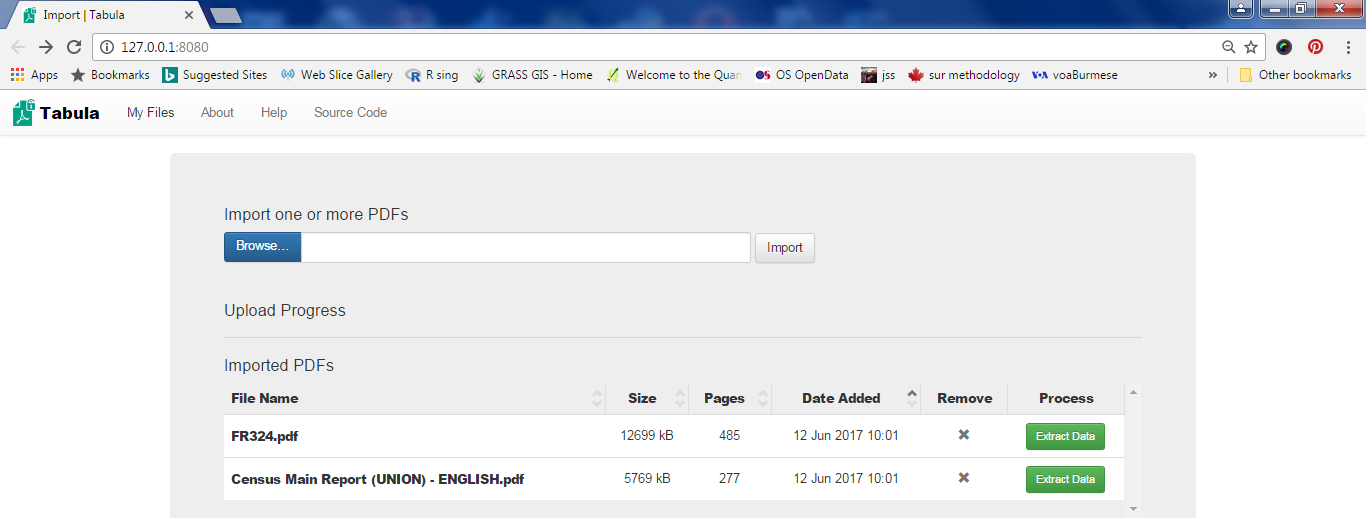
I assume that you have installed the Tabula software and know how to create the shortcut on the desktop of your PC. Now Tabula will be opened and waits for you to specify the pdf files to import. Note that I've specified the names of the two above files and clicked the Import button in the following screenshot.


Now you click the green button to extract data. Here you scroll down to page-52 in the DHS report where the Table 2.7 for population pyramid data is and select the data to be extracted (area shown in pink).


Then click the green button and you get the data preview.


Is the data OK? No! The first column puts “Age” and “Male” together. Well, read the hints given in the text on the left-most side of the Tabula screen and try to adjust the selection so that you get the preview right.


Then saved the data as csv by clicking the Export button.

Step-2: Manipulate data in spreadsheet.
Now I opened the resulting csv file with Open Office Calc:


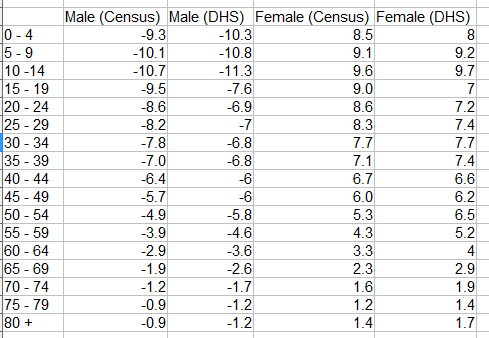
Similarly I exported the Table A-6a giving the population by five-year age groups and sex from the Census report to csv format and opened with Open Office Calc. Collecting the two data sets in a spreadsheet and after the extraction of columns and some arithmetic, I get the following table that has all the information needed to create my population pyramid:


Step-3: Graph it.
The above table shows percentages of males and females of different age groups in their own groups. Notice that males are shown as negative percentages. This is because we need to use a bar chart to draw a population pyramid with males on the left of the X-axis.

Another trick is to align the bars for males(left) and females(right) in the same age group perfectly level. You do this by overlapping bars by 100%.


The final trick is to show percentage labels -15, -10, -5 without the minus signs by changing the number format of the Y-axis.


After adding the title and adjusting colors, lines, font, legend and so on, you should get the final graph: